
Monitoring EFA with NCCL GIN and Nsys#
- Date:
2026-02-28
Abstract#
Distributed training at scale requires deep visibility into network behavior to identify bottlenecks and optimize communication patterns. When training large language models with Megatron-LM on AWS infrastructure using the Elastic Fabric Adapter (EFA), understanding network performance becomes critical for achieving optimal throughput. This article demonstrates how to enable NCCL GPU-Initiated Networking (GIN) in Megatron-LM using Megatron Bridge and leverage Nsys with EFA metrics to monitor network behavior during distributed training workloads. The techniques presented here are based on best practices from AWS re:Invent 2024 [1].
Introduction#
Megatron-LM is a widely adopted framework for training large transformer models using model parallelism, pipeline parallelism, and data parallelism. When deployed on AWS instances with EFA, the network fabric provides high-bandwidth, low-latency communication essential for scaling to hundreds or thousands of GPUs. However, achieving peak performance requires careful tuning and monitoring of the communication layer.
NCCL GPU-Initiated Networking allows GPUs to initiate network operations
directly without CPU involvement, reducing latency and enabling kernel fusion.
Nsys (NVIDIA Nsight Systems) provides comprehensive profiling of GPU kernels,
CUDA API calls, and network operations. When combined with EFA metrics
collection (--enable efa_metrics), Nsys captures detailed network adapter
statistics including bandwidth utilization, packet counts, and error rates,
correlated with GPU execution timelines. This enables practitioners to diagnose
performance issues and validate that the network is operating at expected
capacity.
Megatron Bridge simplifies the configuration and deployment of Megatron-LM training jobs by providing a high-level recipe-based interface. This eliminates the need to manually construct complex command-line arguments and makes it easier to enable advanced features like NCCL GIN and DeepEP for MoE models. Therefore, the tutorial in this article will use Megatron Bridge.
Prerequisites#
This guide assumes the following environment:
AWS HyperPod or EC2 instances with EFA support (e.g., P5, P5e, P5en)
NCCL >= v2.29.3-1 with Device API support
aws-ofi-nccl plugin with GIN support
Megatron-LM with Megatron-Bridge
We have demonstrated how to use vLLM with NCCL GIN and DeepEP in a previous article. If you are interested in building NCCL and aws-ofi-nccl from source, refer to the NCCL GIN article in this repository.
Building the Megatron Container#
The Megatron training environment is packaged as a Docker container and converted to an Enroot squash file for deployment on Slurm clusters. The container includes NCCL with Device API support, aws-ofi-nccl with GIN support, and Megatron-LM with Megatron Bridge.
To build the container and create the Enroot image:
cd src/megatron
make build
This will create a megatron-lm+latest.sqsh file that can be used with the
Slurm launcher scripts. For details on the container build process, refer to
the Dockerfile
and enroot.sh
scripts in the repository.
Enabling NCCL GIN in Megatron Bridge#
Megatron Bridge recipes provide a declarative way to configure training jobs.
To enable NCCL GIN for MoE models using DeepEP, the following environment
variables are set automatically by the srun.sh launcher script:
export DEEP_EP_BACKEND=nccl
export NCCL_GIN_TYPE=2  # proxy-based GIN
export LD_LIBRARY_PATH=/opt/amazon/ofi-nccl/lib:$LD_LIBRARY_PATH
NCCL_GIN_TYPE=2 selects the proxy-based implementation, where a CPU thread
mediates GPU-initiated transfers. This mode is currently supported on EFA,
while GPU Direct Async Kernel-Initiated (DAKI) networking (NCCL_GIN_TYPE=3)
is not yet available on AWS at the time of writing (February 2026).
The srun.sh script also configures additional EFA-specific settings for
optimal performance:
export FI_PROVIDER=efa
export FI_EFA_USE_DEVICE_RDMA=1
export FI_EFA_FORK_SAFE=1
export NCCL_NET_PLUGIN=/opt/amazon/ofi-nccl/lib/libnccl-net-ofi.so
export NCCL_TUNER_PLUGIN=/opt/amazon/ofi-nccl/lib/libnccl-tuner-ofi.so
export NCCL_BUFFSIZE=8388608
export NCCL_P2P_NET_CHUNKSIZE=524288
Launching Megatron Training with DeepEP and NCCL GIN#
The following example demonstrates how to launch a DeepSeek-V2-Lite pretraining job with DeepEP enabled for MoE token dispatching. The recipe configures the model to use expert parallelism across 64 ranks with NCCL GIN for low-latency all-to-all communication.
cd src/megatron

# Allocate 2 nodes on Slurm
salloc -N 2

# Launch DeepSeek-V2-Lite with DeepEP and NCCL GIN
./srun.sh recipes/deepseek_v2_lite_pretrain.py \
    hf_path=/fsx/models/deepseek-ai/DeepSeek-V2-Lite \
    moe_token_dispatcher_type=deepep \
    model.tensor_model_parallel_size=1 \
    model.expert_model_parallel_size=64 \
    model.sequence_parallel=false
The moe_token_dispatcher_type=deepep argument enables DeepEP as the MoE
dispatcher backend. Under the hood, the recipe configures the following
settings:
cfg.model.moe_token_dispatcher_type = "flex"
cfg.model.moe_flex_dispatcher_backend = "deepep"
cfg.model.moe_enable_deepep = True
cfg.model.moe_shared_expert_overlap = False
When the training job starts, verify that NCCL initializes with GIN enabled by checking the logs for Device API initialization messages:
[NCCL] Device API initialized
[NCCL] GIN proxy mode enabled (type=2)
[NCCL Backend] LOW LATENCY MODE: Rank 0 connecting to all ranks
[NCCL Backend] Initialized global rank 0/64
Monitoring EFA with Nsys and EFA Metrics#
Nsys (NVIDIA Nsight Systems) provides comprehensive profiling of GPU kernels,
CUDA API calls, and network operations. The --enable efa_metrics flag
instructs Nsys to collect EFA adapter statistics in real-time from the EFA
device counters (e.g., rdmap113s0, rdmap114s0) at 10Hz sampling rate, including:
TX/RX Bandwidth: Transmit and receive throughput
TX/RX Packets: Packet counts sent and received
Error Counters: Link errors and dropped packets
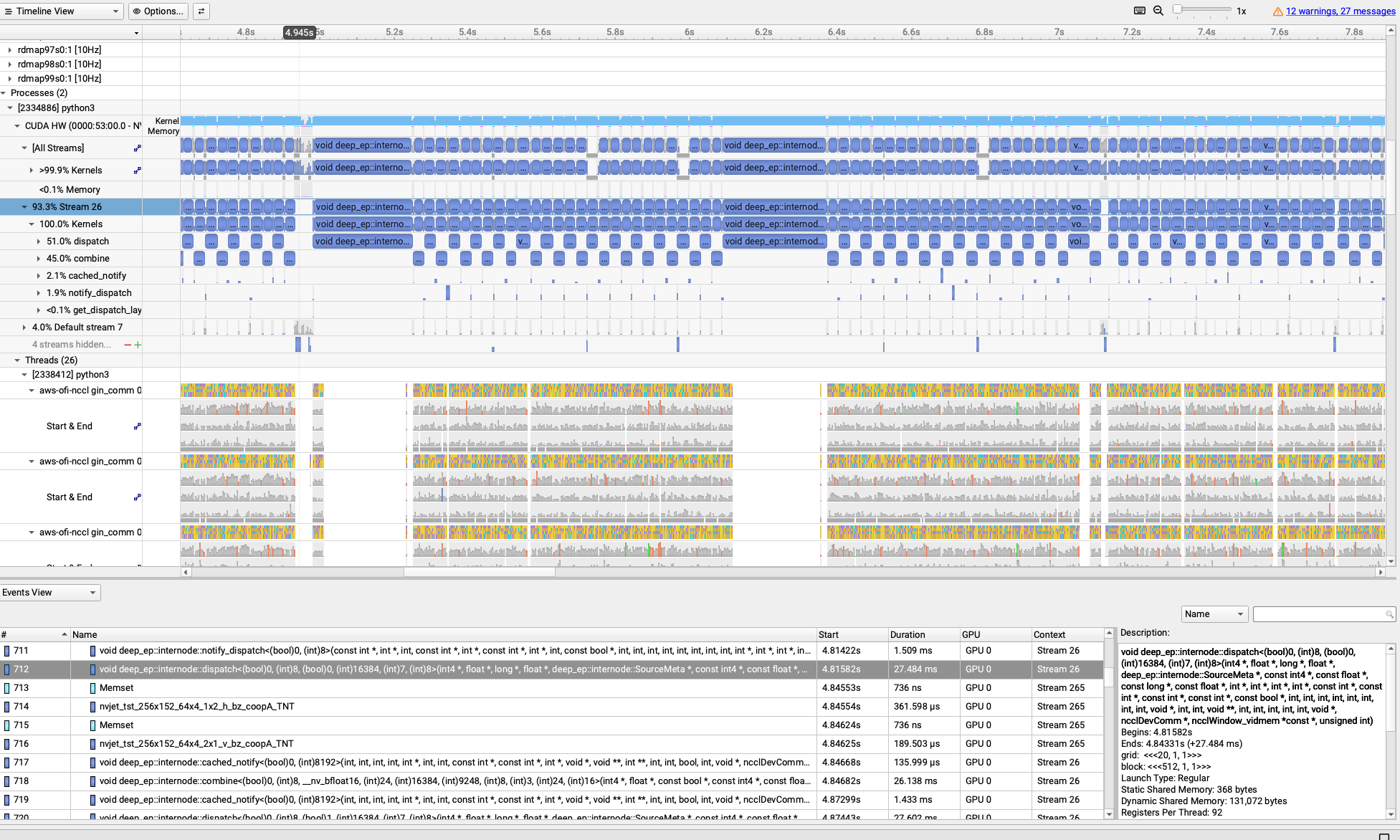
Additionally, aws-ofi-nccl uses NVTX annotations to mark NCCL operations in the timeline, allowing correlation between NCCL collective calls and EFA network activity. These metrics are embedded in the Nsys timeline and correlated with GPU kernel execution and NCCL operations, making it easy to identify communication bottlenecks and validate network saturation.
To profile a Megatron training run with Nsys and capture EFA metrics:
cd src/megatron
salloc -N 8

./srun.sh --nsys recipes/deepseek_v2_lite_pretrain.py \
    hf_path=/fsx/models/deepseek-ai/DeepSeek-V2-Lite \
    moe_token_dispatcher_type=deepep \
    model.tensor_model_parallel_size=1 \
    model.expert_model_parallel_size=64 \
    model.sequence_parallel=false \
    profiling.use_nsys_profiler=true \
    profiling.profile_step_start=10 \
    profiling.profile_step_end=15 \
    profiling.profile_ranks=[0]
The --nsys flag enables Nsys profiling with the following configuration:
nsys profile \
    -t cuda,nvtx \
    -s none \
    --cpuctxsw=none \
    --capture-range=cudaProfilerApi \
    --capture-range-end=stop \
    --enable efa_metrics \
    -o nsys-megatron/profile-<hostname>-rank<RANK>.nsys-rep \
    --force-overwrite=true
The --enable efa_metrics flag is the key parameter that enables EFA adapter
monitoring. Nsys will automatically detect all EFA devices (typically
rdmap182s0, rdmap183s0, etc.) and collect statistics at regular intervals
throughout the profiling session.
After profiling completes, the .nsys-rep files can be downloaded and opened
in Nsight Systems GUI for analysis. The EFA metrics appear as additional rows
in the timeline view, showing bandwidth and packet rate correlated with GPU
kernel execution and NCCL collective operations.
Profiling with Viztracer#
For Python-level profiling of the training loop, Megatron Bridge supports Viztracer, a low-overhead tracing tool that captures function calls and timing information. This is useful for identifying CPU bottlenecks in data loading, preprocessing, or scheduler logic that may indirectly impact network performance.
salloc -N 2
./srun.sh recipes/deepseek_v2_lite_pretrain.py \
    hf_path=/fsx/models/deepseek-ai/DeepSeek-V2-Lite \
    train.train_iters=100 \
    profiling.use_viztracer=true \
    profiling.profile_step_start=10 \
    profiling.profile_step_end=15 \
    profiling.profile_ranks=[0]
The resulting .json trace files can be visualized in the Viztracer web UI
or Chrome’s chrome://tracing interface. By enabling log_torch, Viztracer
can capture additional PyTorch-level details such as NCCL stream and CUDA stream
operations, providing visibility into the execution flow of collective
communications and GPU kernels. However, to observe detailed EFA adapter
statistics (bandwidth, packet counts, error counters), Nsys with
--enable efa_metrics remains the required tool.
Conclusion#
Nsys profiling with --enable efa_metrics now provides the capability to
monitor both EFA adapter behavior and NCCL operations simultaneously during
distributed training. This visibility is essential for diagnosing whether long
NCCL operation times are caused by actual EFA transmission delays or other
issues such as CPU bottlenecks, memory contention, or suboptimal NCCL
configuration. By examining the correlated timeline of GPU kernels, NCCL
collectives, and EFA bandwidth utilization, practitioners can pinpoint the root
cause of performance bottlenecks and validate that the network fabric is
operating at expected capacity.
In this article, we demonstrated this monitoring approach using Megatron-LM with NCCL GIN and DeepEP as an example. The recipe-based approach of Megatron Bridge simplifies the deployment of complex training configurations, making it easier to adopt advanced features like DeepEP and NCCL GIN for large-scale MoE model training while maintaining full observability into network performance.
For complete examples and scripts, refer to the megatron directory in this repository.